

From search engine optimization to conversion rate optimization, there are tons of things you could do to your website to achieve specific results. But did you know that optimizing your website for screen reader accessibility could boost your SEO and increase your conversions?
Screen reader accessibility entails designing and coding digital content so it can be accurately read and understood by screen readers.
In the U.S alone, there are an estimated seven million people with visual impairments who need alternative methods to engage in any activity that people with normal vision would do using their eyes
Many of these people rely on screen readers either fully or partially to access the internet. Not only is it your responsibility as a web developer or site owner to ensure your website is accessible to this audience, but it is also a legal requirement in most countries.
In this article, we’ll go through everything you need to know about screen reader accessibility, from what it is to how it’s done, to the best tools to use.
What Screen Reader Accessibility Really Means

A screen reader is an assistive technology device that translates on-screen digital content into speech or braille output. They allow blind people or those with visual impairments to navigate websites and use applications.
To function, screen readers rely on the information provided to them by browsers and user agents. Browsers expose an accessibility tree based on the page’s structure, which screen readers then use to navigate and read aloud elements like text, images, and forms.
Browsers, in turn, rely on the programmatic rendering of digital content. This means that the responsibility mainly lies in the hands of the web developer and how the website was built.
When a website is properly designed for screen readers, users can understand the layout, move logically through menus, and access every feature without visual cues. This is what is known as screen reader accessibility. But when developers overlook accessibility basics, screen readers can misinterpret content or skip it entirely, leaving users confused or locked out of important sections.
Screen reader accessibility usually entails things like using semantic HTML, alt text for images, proper heading hierarchy, and other best practices we’ll explore later in this article. These practices help browsers generate a clean and accurate accessibility tree.
Up next, we’ll look at the most common pitfalls that make websites difficult for screen readers to interpret.
Learn more about screen readers in this article: NVDA vs JAWS: Which is Better?
Top Pitfalls That Break Screen Reader Accessibility
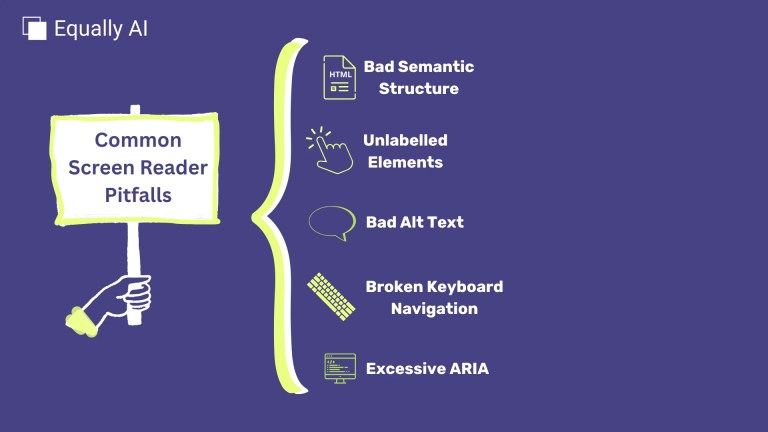
Screen reader accessibility might seem straightforward, but even small mistakes can create big barriers for users. Many website owners and developers unknowingly make errors that block screen readers from working properly.
Here are the most common pitfalls websites fall into.
1. Poor or Missing Semantic Structure
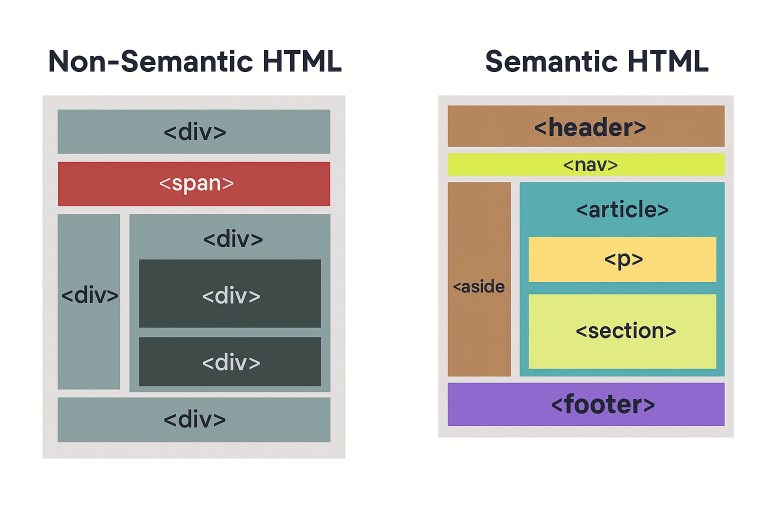
A clear, logical structure is the foundation of screen reader navigation, yet it’s one of the areas most frequently neglected.
Developers often rely heavily on generic elements like <div> and <span> for layout purposes without realizing that they strip away meaning for assistive technologies.
Others skip heading levels or use them inconsistently, which can leave screen reader users with no sense of hierarchy or page flow.
When this happens, the browser’s accessibility tree that screen readers rely heavily on becomes messy or incomplete.
This result is a poor screen reader accessibility experience, such that users can’t easily tell where they are on a page, what section they’re in, or how the content connects.
2. Unlabelled Interactive Elements

Even in 2025, it is still common to find buttons and links that tell screen readers almost nothing. This is because a button might visually appear obvious but have no programmatic label, leaving the user to guess its purpose. The same applies to links labeled “click here” or “learn more”, offering no clue about their destination.
Developers often fall into this trap when focusing on the visual design, forgetting that not all users can see the interface.
Similarly, interactive components like dropdown menus or modals may open and close smoothly for sighted users, but without attributes like aria-expanded or aria-controls, screen readers don’t register that anything changed.
For someone relying on assistive technology, that creates a confusing and incomplete experience.
3. Images Without Meaningful or Correct Alt Text
Images play a huge role in visual storytelling, yet alt text is still one of the most poorly implemented accessibility features online. Many websites either skip the alt attribute entirely or fill it with meaningless text like “image123” or “photo.”
This usually happens because developers rush to meet deadlines, use automated CMS uploads, or assume the alt text field isn’t important.
When that happens, screen readers announce either the file name or nothing at all. For users who depend on auditory cues, it breaks the continuity of the page.
Even well-meaning developers sometimes over-describe decorative images. This ends up cluttering the experience instead of clarifying it.
4. Broken or Nonexistent Keyboard and Focus Navigation
Screen reader users typically rely on a keyboard to navigate, but many sites are still built with a mouse-first design in mind. It’s common to find pages where tabbing skips key elements, focus indicators disappear, or interactive components trap the user entirely.
This usually happens when accessibility isn’t tested beyond visual interaction. Unfortunately, many developers still assume that “if it looks right and clicks right, it works”.
That assumption leaves non-mouse users, like screen readers, unable to move logically through the site, and this is an all too common problem in screen reader accessibility
5. Live and Dynamic Content Not Announced Properly

Modern websites are increasingly dynamic, updating content in real time, from live chats to notifications to expanding panels.
However, the problem arises when these changes happen silently. Because screen readers can’t detect or announce updates that aren’t programmatically communicated, users may miss crucial information.
This pitfall often occurs when developers focus on front-end performance or visual animations but forget that assistive technologies can’t “see” these changes unless explicitly told. What feels like a smooth, modern experience for sighted users can feel like a disorienting silence for others.
6. Over-Reliance on ARIA Instead of Native HTML
ARIA attributes can be powerful tools, but they’re also one of the most misused. Many developers lean on ARIA as a quick fix when native HTML elements would perform better.
This over-reliance often stems from not fully understanding what ARIA does, or from copying code snippets without testing how they behave with screen readers.
The result is that screen readers sometimes receive conflicting signals: an element that “looks” like a button but acts like a div, or one that has multiple roles assigned by accident. These inconsistencies can make navigation unpredictable and confusing for users
7. Content Order That Doesn’t Match Visual Layout
Designers often rearrange elements visually with CSS or frameworks like Flexbox or Grid while forgetting that screen readers follow the actual HTML order, not what appears on the screen.
This means a user might hear the sidebar content before the main article or encounter a navigation menu in the wrong place. For users listening to the page, it makes the experience incoherent.
Why Should You Optimize for Screen Readers?
Apart from the obvious moral obligations to optimize your websites for screen reader accessibility, there are more things at stake. You’re doing far more than just the right thing; you’re opening doors to a significant market, better brand perception, and stronger performance.
Here are some more reasons you should take screen reader optimization seriously.
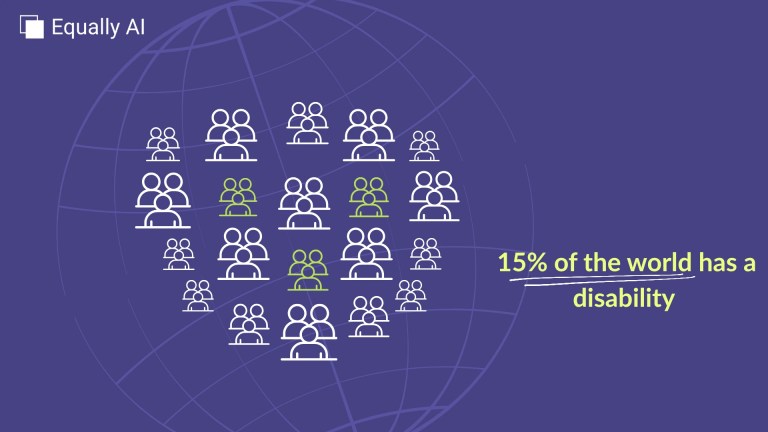
- There is A Massive Underserved Market: Globally, at least 1 billion people live with some form of disability, which is about 15 % of the world’s population.
These individuals, along with their friends, families, and wider networks, represent one of the largest underserved consumer segments. According to Return on Disability Group and other sources, the spending power of this market is measured in the trillions of dollars.
When you make your website accessible, you’re tapping into this market, not only directly, but also through the broader circle of influence these users carry (caregivers, friends, family). For many businesses, this is an opportunity that is still under‑leveraged. - Boost to Brand Reputation and Loyalty
Accessibility signals inclusion and respect. When your website genuinely works for people using screen readers, you’re demonstrating that you value all users, not just the majority.
Research shows that businesses that prioritise disability inclusion and accessibility earn stronger brand loyalty, especially from communities that are often overlooked.
As people begin to associate you with being socially responsible, it boosts your positive PR and, in turn, can positively affect your SEO, brand reach, and conversions.Furthermore, an accessible website sends positive signals externally to customers, to partners, and to search engines, portraying you as thoughtful, forward‑looking, and attentive to detail.
- Tangible SEO & Conversion Benefits
Accessibility and web performance go hand in hand. Clean semantic markup, properly labelled images, and a content structure that supports screen readers often overlap with best practices for SEO and user experience.
According to an accessibility buyer’s guide, sites that adopt strong accessibility practices can see a “5‑20 % lift in SEO and overall marketing performance.”
Meanwhile, poorly accessible websites risk losing users. One study reports that 71 % of people with disabilities will leave a website immediately if it’s not accessible. - Legal Requirements.
Beyond ethics and business benefits, accessibility is now a legal expectation in most regions. Laws such as the Americans with Disabilities Act (ADA) in the U.S., the European Accessibility Act (EAA) in the EU, and the Accessibility for Ontarians with Disabilities Act (AODA) in Canada all require digital accessibility compliance.
Screen Reader Accessibility Best Practices
1. Consult with People Who Use Screen Readers

This is an often-overlooked practice. People decide to solve a problem for individuals with visual impairments without actually consulting the affected demographic.
It is standard practice to consult a visually impaired accessibility testing consultant before and after you remediate your website’s accessibility issues. Before, so that you know just what your priorities should be, and after, to determine how well you measure up against your goals.
Similarly, getting appraisals for your website by an accessibility specialist at regular intervals is also one of the best practices. It will help you stay ahead of accessibility issues, whether related to screen readers or not.
2. Test Performance Quality with Different Screen Readers
The top screen-reading technologies in the market, JAWS, NVDA, and VoiceOver, work alike. But some differences may affect the way certain users experience your websites due to the peculiarities in their screen readers. Ensure to test your website with the top screen readers to guarantee that you’re solving for a wide range of devices and user agents.
3. Use Semantic HTML
Semantic HTML is the foundation of screen reader accessibility. Proper HTML accessibility practices are vital to ensure proper screen reader accessibility. HTML forms the most basic element of most websites. It stands for Hypertext Markup Language. It’s debatably a programming language used to construct the structure of a website. HTML consists of tags, metatags, and attributes that define how elements of a webpage should appear.
Semantic HTML is HTML that makes contextual sense. For instance, rather than using generic tags such as <div>, <span>, and <b> to markup the entire page outline, use contextual tags such as <header>, <nav>, <main>, <aside>, <section>, and <footer>. This ensures that the screen reader can more accurately parse the information it comes across and read out text in a way that makes sense to the hearer.
4. Provide Descriptive Links
Instead of using link anchor texts that don’t describe the destination of the link, provide descriptive links every time. Links are more than just navigation; they are context for screen reader users.
Using vague phrases like “click here” or “read more” leaves users unsure about the destination. Descriptive, context-rich link text gives users the information they need to make decisions without relying on visual cues.
5. Always use Alt Text for Images
Alternative text (alt text) has to be the most talked-about web accessibility fix. That’s because the use of proper alternative text helps improve the overall user experience of a website.
Well-written alt text helps screen reader users understand visuals, improves SEO, and provides context for even visual users when images fail to load.
It helps people with visual impairments who use screen readers to understand what the image shows. It also provides more context for search engines, thereby improving SEO.
6. Use ARIA only when necessary
ARIA stands for Accessible Rich Internet Applications. It’s a system of programmatic enhancements for HTML that enables developers to give meaningful context to HTML elements.
By using HTML attributes, ARIA lets developers express a wide range of HTML semantic concepts. This extends HTML elements’ functionality beyond what is currently possible with semantic HTML tags. In ARIA, the first rule is to use native HTML elements or attributes with the semantics and behavior you need instead of repurposing an element and adding ARIA.
HTML elements that lack semantic specifications, such as <span> and <div>, can be defined and assigned roles, states, and labels with ARIA. Roles represent the specific functions of elements on a webpage, states are conditional states (such as the checkbox being checked or unchecked), and labels are the names of elements.
Make Your Website Accessibility Compliant Today
Closing Thoughts
Alt text is a tenet of accessible web design. Its original (and still primary) purpose is to describe images to visitors who are unable to see them. This includes screen readers and browsers that block images, but it also includes users who are sight-impaired or otherwise unable to visually identify an image. Including alt text with your images ensures all users, regardless of visual ability, can appreciate the content on your site.
Equally AI provides a complete web accessibility solution for your website, which, of course, includes alt text. That’s not all, Equally AI also has a dedicated accessibility profile for people who use screen readers. So, in addition to making your website accessible, we enhance your users’ experiences by giving them customized profiles.
![Read more about the article 8 Website Accessibility Audit Tips [With Dos and Don’ts]](https://blog.equally.ai/wp-content/uploads/2021/12/lukas-blazek-mcSDtbWXUZU-unsplash-1-300x199.jpg)

