
Want to build a rock-solid compliance plan to meet the ADA, EAA, and other regulations? Learn web accessibility best practices and solutions to help you meet your goals.
Table of Contents
If you’ve been following recent headlines, you’ve likely seen a rise in lawsuits over inaccessible websites. Laws like the Americans with Disabilities Act (ADA) are being enforced more strictly in the United States. Meanwhile, the European Accessibility Act (EAA) will be fully implemented across Europe by June 2025. The penalties for non-compliance are pretty serious: steep fines, reputational damage, forced business closures, and even prison sentences (in countries like Ireland).
Many organizations understand the need for compliance. But, the real challenge is figuring out how to implement effective, scalable solutions without disrupting their operations or draining limited resources. Here are 10 tested-and-proven strategies from Equally AI’s accessibility consultants to help you meet legal standards while protecting your audience and bottom line.
1. Prioritize High-Impact Fixes
Let’s face it: not every accessibility issue on your site can be fixed overnight. But here’s the thing—some changes make a much bigger difference than others, especially for compliance and usability. If you’re serious about getting results quickly, focus on high-impact fixes first.

Take color contrast, for example. According to the 2024 WebAIM Million Report, 81% of homepages fail color contrast standards. This means users with visual impairments struggle to read basic content. Add inaccessible navigation menus and missing alt text into the mix, and you’ve already lost a significant portion of your audience. These issues don’t just frustrate users—they leave you vulnerable to ADA and EAA non-compliance claims.
Here’s a simple approach you can implement to prioritize fixes:
- Start with high-traffic pages like the homepage, product pages, and checkout flow. These are where most users interact with your site.
- Fix critical errors first. Improve color contrast, add alt text to images, ensure keyboard navigation works on every page, and provide text-based alternatives for multimedia content.
- Test like a real user, not just with a tool. Automated scanners can find obvious WCAG violations, but they won’t tell you if your site is actually usable. Navigate it yourself with a screen reader. Try using it with only a keyboard. If you struggle, so will your users.
Quick Summary: Not every accessibility issue can be fixed overnight, but some have a bigger impact than others. Start with high-traffic pages, fix critical barriers and test with real users.
2. Leverage AI-Powered Tools
Of course, we’ll mention this, but hear us out. This is not a sales pitch. We’ve got good reasons. Businesses new to web accessibility often feel overwhelmed by technical guidelines, evolving regulations, and the sheer scale of fixing accessibility issues. That’s where automation becomes invaluable.
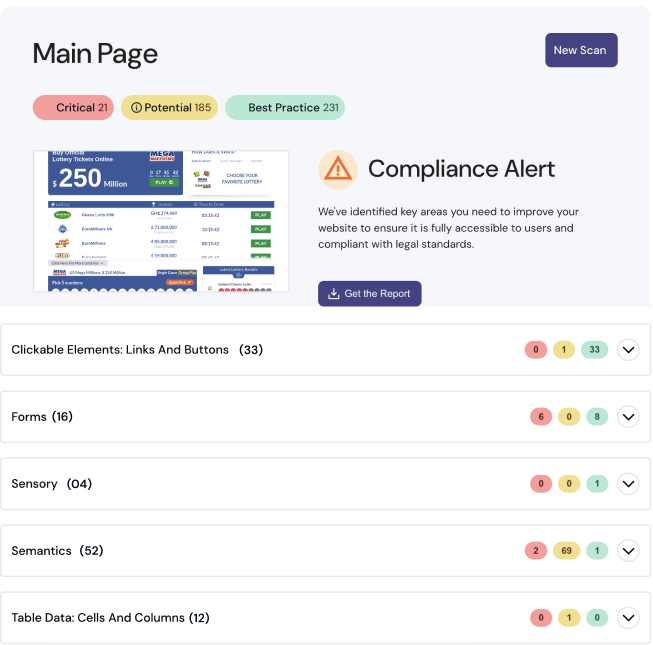
Here’s why AI-powered accessibility tools are a ‘must-have’ in your compliance strategy toolkit:
- They can scan your site in seconds, flagging common non-compliant elements like missing alt text, poor color contrast, or inaccessible forms.
- Some AI-powered accessibility solutions like Equally AI provide instant remediation recommendations for certain issues, reducing your need for manual intervention.
- Automated accessibility audits free up your team to focus on other priorities, cutting down on time-consuming audits and costly manual fixes.
- They help you scale easily as your website grows or accessibility regulations evolve.
Quick Summary: AI-powered accessibility tools can simplify compliance by automating tasks that traditionally require extensive manual effort. They can also provide actionable insights to help you stay compliant over time.
3. Integrate Accessibility Early in the Product Lifecycle
Most businesses think about accessibility after their product launches, but by then, it’s often too late or too expensive. Research from Forrester shows that fixing accessibility issues post-launch can cost three times as much as addressing them during the design phase. Making accessibility part of your workflow from the start isn’t just cost-effective—it’s also the easiest way to create products that work for everyone.

Think about the forms on your website. Do they have clear labels that work with screen readers? Or what about your dynamic content—does it meet WCAG standards for interactivity? Small decisions like these made during the design and development process can save your team time and prevent expensive rework later.
Quick Summary: Instead of retrofitting accessibility at the end of a project, embed it from the start. This is often more cost-effective and ensures a better overall user experience, saving resources and time in the long run.
4. Improve Mobile & Voice Accessibility
Mobile devices account for about 61.6% of global web traffic, and that number will keep growing. Optimizing for mobile and voice accessibility starts with responsive design. Ensure that buttons are large enough to tap (at least 48×48 pixels) and content adapts to different screen sizes without horizontal scrolling. Users must also be able to navigate the mobile website or app using one hand and voice commands.
Use built-in screen readers on mobile devices, like VoiceOver (iOS) and TalkBack (Android), to experience the site as users would. If the navigation feels unclear, or frustrating, it’s not accessible. Fix it.
Quick Summary: Ensure your site adapts to all screen sizes, supports one-handed navigation, and works well with voice commands and screen readers.
5. Develop a Company-Wide Accessibility Policy
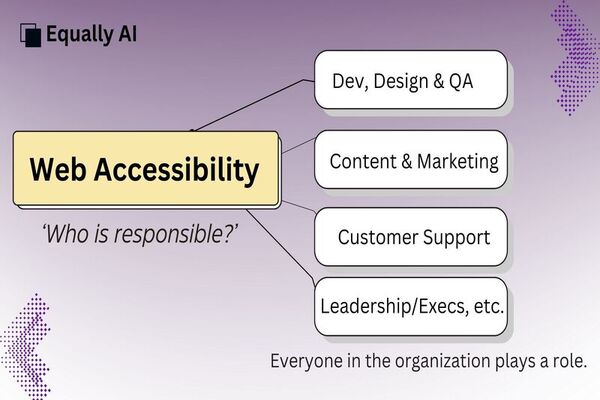
Accessibility should not be a one-person or one-team project but a company-wide commitment. If your developers are focused on accessibility but the marketing or customer support team isn’t, you’re only solving part of the problem. Without a unified strategy, accessibility efforts become inconsistent, leading to compliance risks and a poor user experience.
A good policy does more than set goals; it assigns responsibilities. Who is accountable for accessibility testing? Which team handles compliance reporting? Breaking these tasks down ensures that nothing slips through the cracks.
Here’s an approach that works: embed accessibility into daily tasks across departments.
- The marketing team should ensure all images have descriptive alt text, videos have captions, and social media posts are accessible.
- Developers and designers must follow WCAG 2.2 standards when building web projects.
- QA teams review content and interfaces for compliance risks before launch, etc.
Also, conduct regular cross-team reviews to keep everyone aligned. Embedding accessibility into your culture in this way ensures it doesn’t fade away with leadership changes or staff turnover.
Quick Summary: Create a documented policy that spells out your accessibility goals and expectations. This helps break down silos in departments, ensuring everyone works toward the same standards.
6. Set Clear & Measurable Goals

Accessibility initiatives often stall without clear milestones, a. It’s not enough to say, “We want our website to be accessible.” You need measurable goals tied to specific deadlines, like achieving partial compliance in three months or full compliance within a year.
Breaking your goals into smaller, manageable milestones keeps teams accountable and motivated. For example, focus on fixing critical pages like your homepage or checkout flow first, then move on to secondary content. Align your timelines with any legislative deadlines to avoid non-compliance penalties.
Quick Summary: Draft an accessibility roadmap with monthly/quarterly/yearly objectives. Include timelines for audits, fixes, and compliance milestones to track progress.
7. Train Your Team
Accessibility is a team effort, but most employees don’t know where to start. It’s not just developers who need to be trained. Marketing teams, content creators, and even customer service staff must understand how accessibility applies to their role.
Skip the theory-heavy sessions and focus on real-world application. Encourage ongoing learning through W3C updates and accessibility groups, but also make training part of everyday work. The more your team knows, the more proactive they can be in maintaining an accessible and compliant business.
Quick Summary: Accessibility isn’t just for developers—every team, from marketing to customer service, has a role to play. With the right training, your team can catch and fix accessibility issues early, saving time and resources.
8. Stay Current with Web Technologies & Laws
New technologies bring both opportunities and challenges for accessibility. Frameworks, browsers, and devices are constantly updated, and older tech can quickly become a barrier for users. Design updates, new content, or platform changes can introduce accessibility issues, even on a ‘compliant’ site.
Regular monitoring and audits ensure you catch these issues before they escalate into legal risks. Combining automated tools with periodic manual accessibility testing gives you a more comprehensive view of your site’s accessibility status. Proactive auditing also ensures you stay ahead of stricter regulations, such as the ADA and EAA.
Quick Summary: Conduct regular reviews of your website to identify outdated tools and frameworks or new content that may introduce accessibility issues.
9. Partner Only with Compliant Tech Vendors
Your vendors and tech partners can significantly impact your accessibility efforts. If you work with agencies, third-party developers, or software providers, ensure accessibility is built into your contracts. Clarify that you expect their solutions to meet WCAG standards—or exceed them. You can also request a completed VPAT (Voluntary Product Assessment Template) called an ACR (Accessibility Conformance Report) to verify their tools and services meet accessibility standards.
💬 Need a VPAT/ACR? Chat with our experts now.
But ensuring accessibility isn’t just about holding vendors accountable—you may need to prove your own compliance too. Businesses often need an ACR to show clients, partners, or regulators that their digital products meet accessibility standards. A self-generated report won’t cut it. It’s best to get an ACR from experts who understand WCAG, test for real-world usability, and can back it up with proper documentation.
Quick Summary: Include accessibility requirements in vendor contracts and request accessibility documentation (like a VPAT/ACR) for any third-party tools you use.
10. Communicate Your Efforts
People care about how businesses treat accessibility, and they notice when it’s done right—or wrong. Sharing your commitment to accessibility through accessibility statements, blog posts, or social media demonstrates transparency and accountability. It also signals to users with disabilities that your brand values inclusion.
Transparency matters. Don’t just say you’re compliant—talk about the steps you’re taking to improve user experiences for everyone., the tools you’re leveraging, and your goals for the future. This not only builds trust with your audience but also positions your business as a leader in accessibility.
Quick Summary: Publish an updated accessibility statement on your website that outlines your goals, progress, and commitment to inclusivity.
Key Takeaways
Accessibility isn’t a one-and-done task. Every choice—design, development, content—shapes the user experience and impacts compliance. If you want to keep your site truly accessible, here are the key web accessibility practices you should focus on:
- Prioritize high-impact fixes on high-traffic pages.
- Leverage AI-powered tools like Equally AI to automate accessibility tasks.
- Integrate accessibility early in the product lifecycle.
- Improve mobile & voice accessibility.
- Develop a company-wide policy with clear goals and responsibilities.
- Set clear, measurable goals with specific milestones and deadlines.
- Train your team—marketing, content, customer service, procurement, etc.
- Stay current with evolving web technologies & regulations
- Work with tech partners and vendors who prioritize digital accessibility.
- Share your commitment to accessibility through accessibility statements, blog updates, and social media posts.
Final Thoughts
Digital accessibility is no longer optional, and waiting until the law mandates compliance could cost your business more than fines. The best time to start? Right now. Audit your site, train your team, and focus on small, impactful steps that drive immediate change.
Our advanced AI-powered web accessibility solution makes it easier to take those first steps to meet legal requirements. You don’t have to tackle accessibility alone. Ready to make progress? Start a 7-day free trial or book a free consultation with us to map out your compliance strategy.